Cue|Create a retrieval prompt
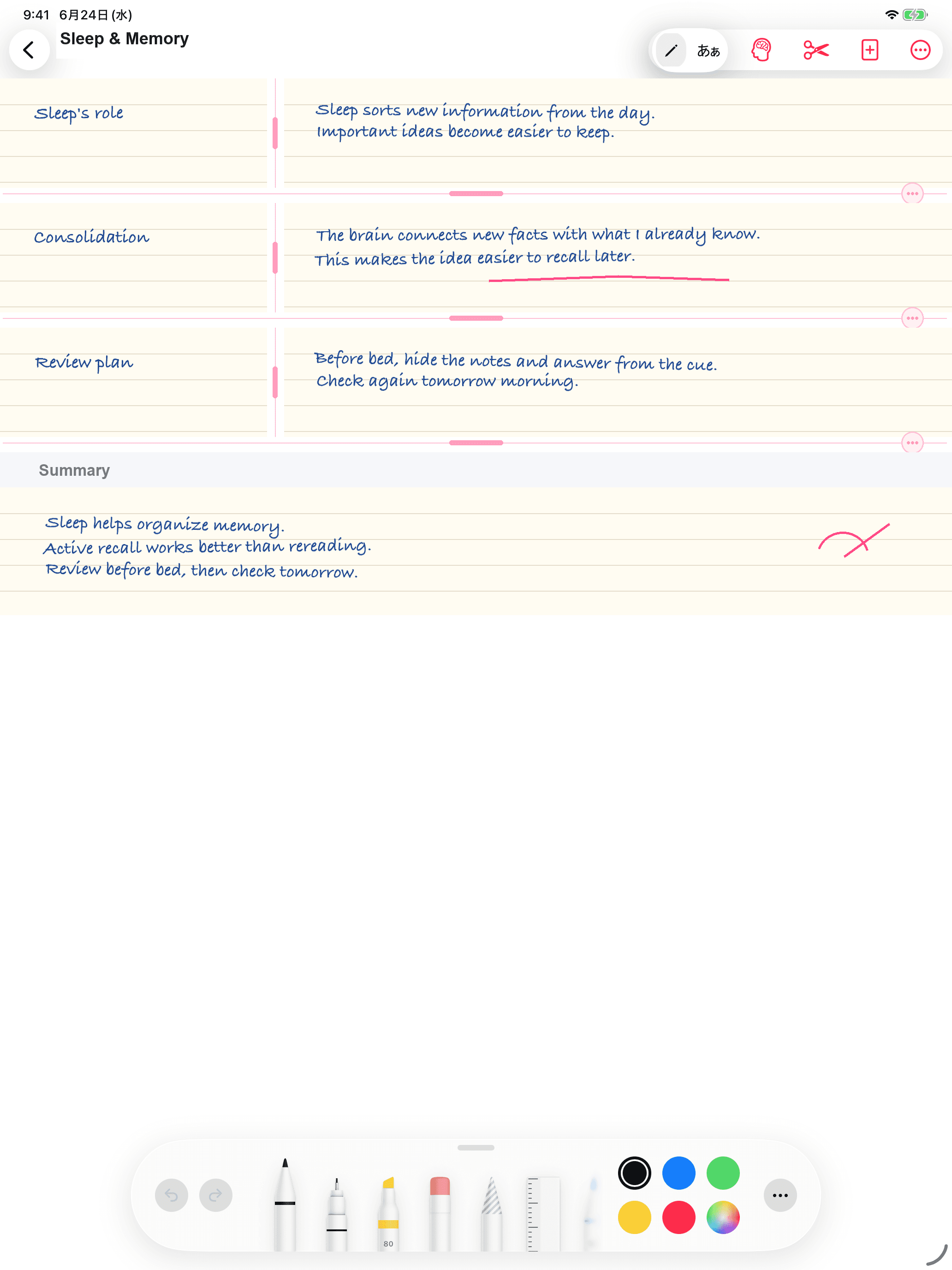
Write a question, key term, formula, or argument on the left to start the act of remembering.
 Recall Notes
A NOTEBOOK FOR SERIOUS LEARNERS
The Cornell note-taking method, brought to iPad.
Bring a note-taking method featured in university study guides around the world to your own learning. Inspired by the Cornell method, Recall Notes connects handwritten sections, cues, and summaries for review.
Divide lectures, exams, books, and seminars into topics. Give every topic its own Cue, hide the Notes, and retrieve the answer from memory.
01Handwriting and text
02Made for iPhone and iPad
03Up to 10 files free
CORNELL-INSPIRED METHOD
Recall Notes builds on the familiar Cue, Notes, and Summary structure, then adds a Recall mode that lets you hide the material and test yourself.
How universities describe and put the Cornell note-taking method into practice.
University of Oxford
Official student study guide
“A well-known approach for note-taking is called the Cornell Method”
Stanford University
Center for Teaching and Learning
“Summarize the reading out loud, using only the key concepts as cues.”
Write a question, key term, formula, or argument on the left to start the act of remembering.
Record explanations, diagrams, examples, and your own thinking with handwriting or text.
Condense the page so you can see what you understand and where your knowledge is still unclear.
Cover the Notes, answer from the Cue, then reveal the material and find what you missed.
BUILT FOR RECALL
Instead of forcing your learning into a fixed page, Recall Notes lets you divide the page around the content. Even in a long lecture, each Cue remains beside the exact Notes you want to review.
WHO IT IS FOR
Designed for learners who care less about making a perfect page and more about understanding, retrieving, and retaining it.
Organize lectures by topic and check your understanding from the Cues before an exam.
Connect definitions, rules, vocabulary, and examples to prompts you can revisit repeatedly.
Separate claims, evidence, and next actions so new ideas can move into your work.
HOW TO USE
Use one page both to record new material and to test whether you can bring it back.
01
Use every note-taking feature and save up to 10 files. The free version includes ads.
02
Save unlimited files and remove ads. The App Store shows pricing for your region.
It divides a page into Cue, Notes, and Summary areas and uses the page for questions, retrieval, explanation, and review as well as recording.
No. Recall Notes is independently developed and provided.
Recall Notes is an independently developed app inspired by the Cornell note-taking method. It is not affiliated with, endorsed by, or provided by Cornell University.
Build a habit of writing, dividing, questioning, and retrieving with Recall Notes.